Auto Analysis Report
Type of Report -
- Standard
Total Subsheets -
- {{ Date }}
Purpose of the Report -
This report provides a thorough overview of emails handled by the email bot, organizing the data based on response modes according to predefined business use cases. It presents the total cases within each use case for each response mode, along with their respective percentages.
Worksheets
{{ Date }}
- Logs data based on response modes according to predefined business use cases of that specific date.
Detailed Description -
Subsheet Name: {{ Date }}
| Name of Column | Description of Field | Where is the value fetched from (Collection: botresults) |
|---|---|---|
| Use Case Name | Workflow name | workFlowEvents |
| Auto | count of the AUTO cases in the respective workflow | controlledResponseMode |
| Agent Assisted | count of the Agent Assisted cases in the respective workflow | controlledResponseMode |
| Unhandled | count of the Unhandled cases in the respective workflow | controlledResponseMode |
| Total | count of the total cases in the respective workflow | sum of value of column Auto, Agent Assisted, Unhandled |
| Auto Percentage | Percentage of Auto Cases in the respective workflow of total cases | Respective percentage is calculated in code |
| Agent Assisted Percentage | Percentage of Agent Assisted Cases in the respective workflow of total cases | Respective percentage is calculated in code |
| Unhandled Percentage | Percentage of Unhandled Cases in the respective workflow of total cases | Respective percentage is calculated in code |
| Total Percentage | Percentage of cases in the respective workflow of total cases | Respective percentage is calculated in code |
Example of Report -
Auto Analysis Report:
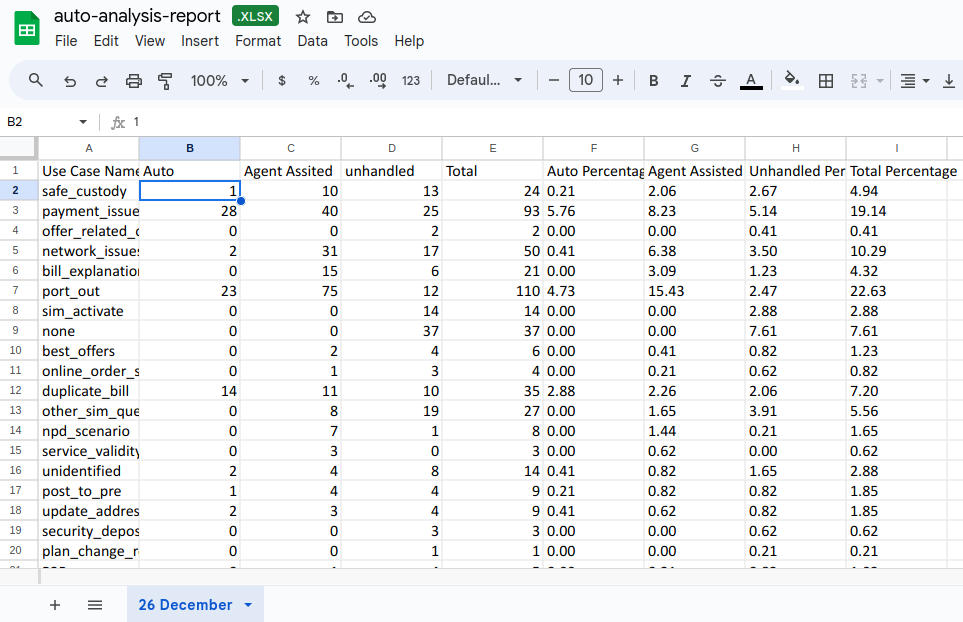
Report-Link :
Report Format -
    *branch : vil-development-master*

    *Path : controllers/autoAnalysisReport.js*
Aggregation -
    *branch : vil-development-master*

    *Path : controllers/autoAnalysisReport.js*