Bot Hung Report
Type of Report
- Standard
Total Subsheets
- Dump
Report Purpose
Bot hung report typically refers to an incident or a situation where a chatbot becomes unresponsive or stuck during an interaction with a user. When a bot "hangs," it stops functioning as expected, ceases to respond, or gets stuck in a loop without providing the intended service or response.
Detailed Description
Subsheet Name: Dump
| Name of Column | Description of Field | Where is the value fetched from Collection: Session_info & chat_logs |
|---|---|---|
| Session Id | User Session Id | sessionId |
| Hung Chats At The End | If bot hung at end of the flow (boolean value) | lastChatLog.snapshot.ongoing_intent_snapshot[0] (if it doesn’t exist) |
| Hung Chats In Between | Boolean value for bot hug in between flow or not | session.chatLog[j].snapshot.ongoing_intents_snapshot[0] |
| WorkflowName | Workflow name in which bot got hung | session.chatLog[j].snapshot.ongoing_intents_snapshot[0].workflowName |
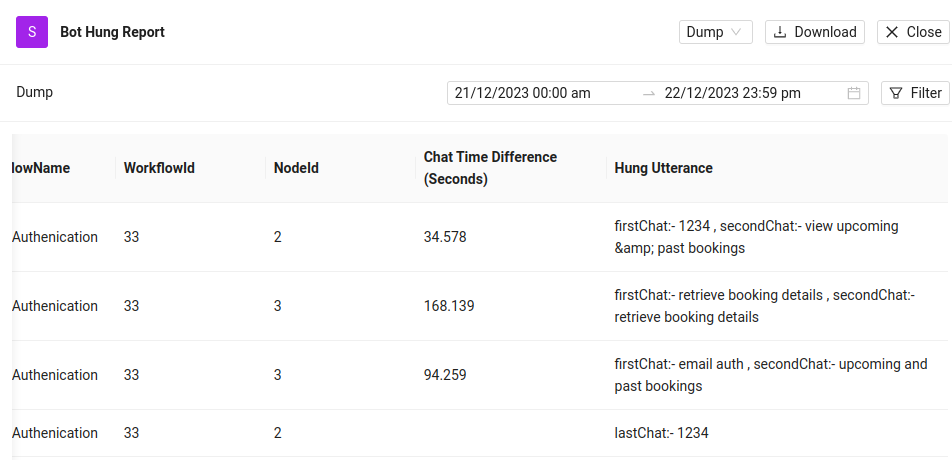
| WorkflowId | Workflow Id | session.chatLog[j].snapshot.ongoing_intents_snapshot[0].wid |
| NodeId | Node id | session.chatLog[j].snapshot.ongoing_intents_snapshot[0].nodeId |
| Chat Time Difference (Seconds) | Time difference between first and second message | Calculate time difference between first message and second message time stamp from chat_log |
| Hung Utterance | Show at which utterance of user bot got hung | Shows first utterance and than second utterance (if exist) |
Example of Report
Whatsapp Dump:
Image 1:
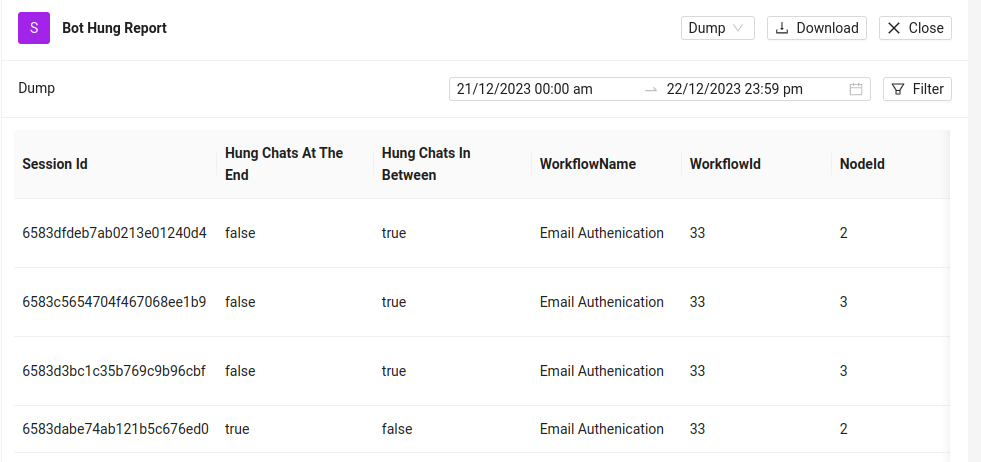
Image 2:
Report-Link :
https://docs.google.com/document/d/1qldA_7dzOW888ZOGshHJ1SYM0KW5NXerKFdEGX1axeI/edit?usp=sharing
Report Format
Branch: development
Reports File: Reports/botHungReport.js
Aggregation
Branch: development
Aggregation Data File: Reports/botHungReport.js