Database Recovery
Introduction
- This doc covers recovery of database in case of db/server crashed.
Scenario
Below are the 3 scenerios for data recovery.
Recovery of Configurational data of db
- Some config data deleted/edited by mistake
- Incorrect data transfer
Recovery of data/collections of db
- some collections/data deleted by mistake
Recovery of db server
- In case of server crashed
Steps
- Configurational data recovery of db
- Data/collections recovery of db
- Database server recovery
Configurational data recovery of db
- If any config data is deleted from db then we can recover configurational data from development db server using data tranfer job of that brand.
- Note: Only configuration data can be recovered using this method.
Data/collections recovery of db
- In this, We have 2 options
- Dump/Restore operation using backup snapshot.
- If any data/collections is deleted from the db then we can recover this from dump and restore process.
- Create a new volume by using backup snapshot.
- Launch a new instance and then attach the volume to the instance.
- Note: Make sure instance and volume should be in the same region to attach the volume with instance.
- After mounted the volume, run the mongo process and perform the dump/restore operation.
- Below are the commands for dump and restore with chat_logs collections. you can mention any particular collections here.
- Dump:
mongodump -d dumpDbName --collection chat_logs -h dumpServerIp:27017 -u dumpDbUser -p 'dumpDbPassword' --authenticationDatabase dumpDbName --gzip -o ./- Restore:
mongorestore -v -h 127.0.0.1:27017 -u dbUser -p 'dbPassword' --authenticationDatabase admin -d dbname --dir ./dumpDbName/ --gzip --dryRun- For data recovery of days you can use the option --queryFile query.json in mongo dump command. Below example is for query.json file.
{
 "createdAt": {
     "$lte": ISODate("2023-03-20T18:30:00.000Z"),
     "$gte": ISODate("2023-03-19T18:30:00.000Z")
  }
}
- Mount volume in existing server
- Create a new volume by using backup snapshot.
- Attach the volume to the existing server and change the mongo conf with new mount point and start the process.
- Dump/Restore operation using backup snapshot.
Database server recovery
- Create a new AMI using backup snapshot.
- Launch a new instance from newly created AMI with same config and existing sg's. You can take config ref from existig db server or s3. below are the s3 path example.
s3://bucketName/brandName/Database/Environment/Development/mongod.conf- OR
s3://bucketName/brandName/Database/Environment/Development/mongoConf/primary|secondary/mongod.conf
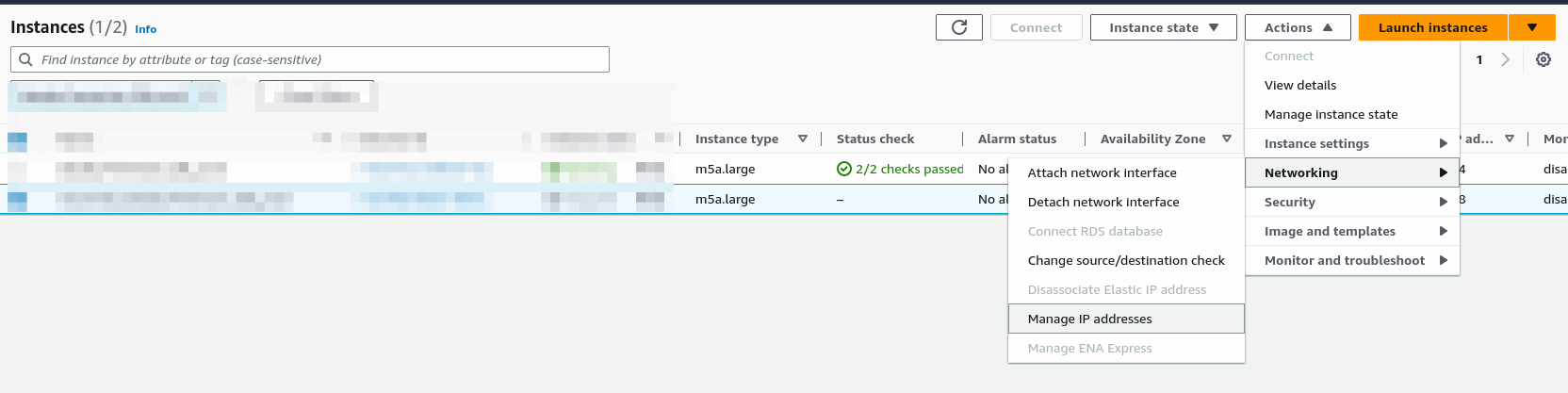
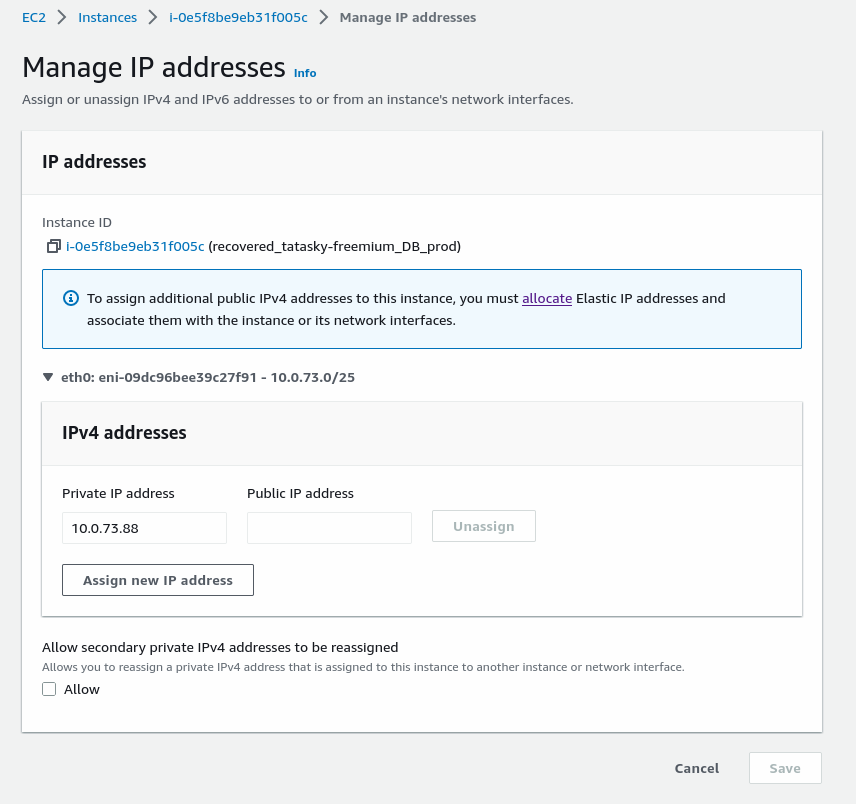
- Then attach the existing crashed server ip to new server using networking configuration. so that we don't need to change the ip in all envs.
- Steps to attach/change the ip of an instance as shown below.
- After changed the ip log into the server and run the required processes. like mongo,redis.
- If you face any issue during changing the ip OR not able to attach the existing ip to the new server then update the ip of new db server in all envs.
- After updation of envs then deploy the required services. like ocs,user,scheduler.