Access Management
Repo Managed Access
Access Provisioning
Note: Before taking any action on repo first create your branch from master branch i.e v2.
Database Access
Access Management Repo will be used to track all access a user has. Database access for a particular brand must be given according to the values present
db_users.jsonfile underdbUsersfor that particular brand.Note: Never share root db URI with anyone.
Dev
Each user will have his/her own set of database credentials and saved in aws parameter store.
If user creds is not present in aws parameter store then create a new password and add in the parameter store with username and creds. you can take ref from exising users.
Naming Convention: ori-nipunRW
The user should have the readWrite role for dev brands db only.
If any user req database access for a brand then first add his/her name in
db_users.jsonfile insidedbUsersfolder of that brand.Below are the example for your ref.
{
"userName": "ori-nipunRW",
"role": "readWrite"
}
Then push the code in your branch and and raise a PR from your branch to v2 branch with devops lead as a reviewer. it will be reviewed and merged by Devops Lead only.
Run the dbuser operation Job with below parameters.
- type: creation
- env : dev/uat/prod
- Note : Don't change any other parameters except above in job.
Job will cmompare the users from db with repo then additional users will be created with their respective role in that brands in which you have added the name.
These creds will be same across all the brands user works on.
Make sure user for admin database isn't created by mistake
UAT/PROD
Note Before taking any action on uat/prod db specially incase of write access approval from DevOps Lead or Anurag is required
A common read-only user will be created if not already exists with below role.
- user: reader
- Role: productionReadRole
- Then share the details with user.
For new user, it should ideally be created with a specific role based on the use case.
- Like if anyone need reporting access then create that user with below role. but after approval.
- Naming Convention: ori-nipunRW
- Role: reportingRole
- Like if anyone need reporting access then create that user with below role. but after approval.
If under exceptional cases, someone needs write access of database.
- After getting approval, create a new user for that particular case with below role.
- Naming Convention: ori-nipunRW
- Role: productionWriteRole
First add the user in repo first then push the code in your branch with devops lead as a reviewer and raise a PR from your branch to v2 branch. it will be reviewd and merged by Devops Lead only.
After merging the code then run the dbuser operation Job with the below parameters.
- type: creation
- env : dev/uat/prod
- Note : Don't change any other parameters except above in job.
job will compare the users from db with repo then additional users will be created with their credentials and roles.
credentials of those addtional users will be fetched from parameter store.
Make sure to delete the user once the work is done otherwise by EOD.
- This needs to be ensured at all cost. When a new user is being created on prod with write access, create a JIRA task to remove that user to avoid confusions.
Server Access
Dev
- Add user's ssh public Key in
allKeysdirectory if not already present.- .key naming: firstName_lastName.key
- Append the name of the .key file to
usersfile underuserKeysdirectory for the project he/she needs access to. - After adding the key and push the code in your branch and raise a PR from your branch to v2 branch with devops lead as a reviewer. it will be reviewd and merged by Devops Lead only.
- After merging the code run the server accessmanagement job.
- Job will update the
authorized_keys_autoon s3 acc to users file in which you have updated the key for that brands. - A cronjob has setup on servers which will run every 10m to fetch the updated
authorized_keys_autofile from s3. - If the project dir doesn't exist, consult with DevOps team/lead before moving ahead.
- Add user's ssh public Key in
UAT/Prod:
- Access to uat/production infrastructure is limited only to the DevOps team.
Access Revocation
When an employee leaves the following access revocation needs to be done:
IAM user needs to be removed from the IAM console.
emailID needs to be deleted from the Google Admin console.
Check and remove jenkins access from jenkins console.
For database and server access revocation go the repo & open in then VS code and then press ctrl+shift+f and search for user. below screeshot is for you ref.
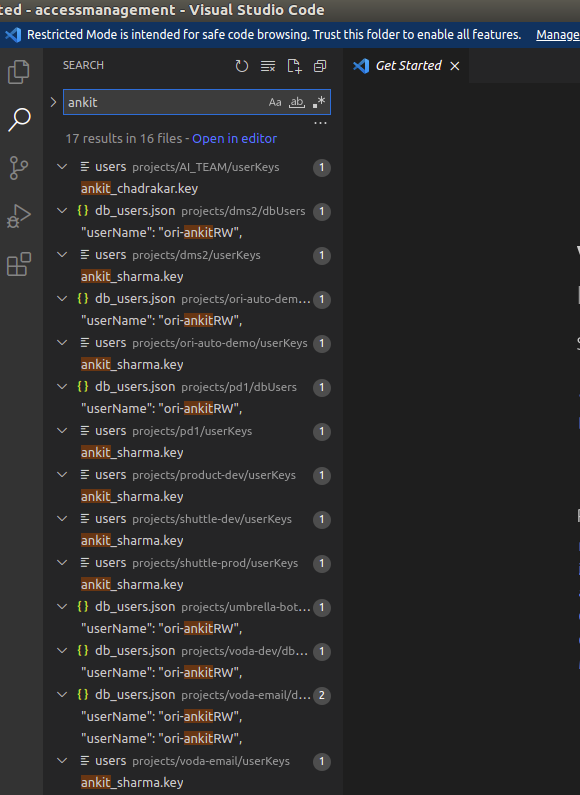
- Then remove the user from all folders and after removing search again in VS code. now no result should come with the user related info in repo.
- Below are the steps for database and server access.
Database access
- It will be removed from all brands in which he has access. please follow the below steps for the same.
- Check and remove that users from
db_user.jsonfile indbUserswith their role from all brands and then push the code in the your branch. - Then raise a PR from your branch to v2 branch with devops lead as a reviewer. it will be reviewed and merged by Devops Lead only.
- After merging the code run the user operations Job with below parameters.
- type: deletion
- env : dev/uat/prod
- Job will compare the users from db with repo and then addtional users will be deleted from all brands.
Server access
- It has to be revoked from all brands in which he has access, please follow the below steps for the same.
- This will be done by removing user's key from Access Management Repo.
- move
.keyfile of that user fromallKeysdir toarchivedKeysdir. - Then for each item in
projectsdirectory. - Check and remove user's name from
usersfile inuserKeys. - After removing those user's name from repo then push the code in your branch with devops lead as a reviewer and raise a PR from your branch to v2 branch. it will be reviewd and merged by Devops Lead only.
- Run the server accessmanagement job.
- move
Other Access
AWS Access
AWS access is mostly restricted to the DevOps team. However, if and when someone makes and request, following needs to be considered.
Console/API
- Individual user needs to be created and must be added to forceMFA group.
- If a new policy has to be created, it should be created in a generalized way and attached to a group.
- The user must now be added to this group. In future if any one else requests for similar access, he/she must be added to the same group.
Infrastructure
.env Sharing
- Do not share the same credentials as in the .env from S3.
- While setting up production environment, a new read only used needs to be created.
- This user will be shared with the requestor.
- If someone asks for production/uat env(mostly ai or reporting team), the read only access should technically work, .env needs to be updated accordingly before sharing.
- If someone needs write access:
- We will create a new user for that particular case.
- Share the credentials with the user.
- And make sure to delete the user once the work is done, after 2 days otherwise.